
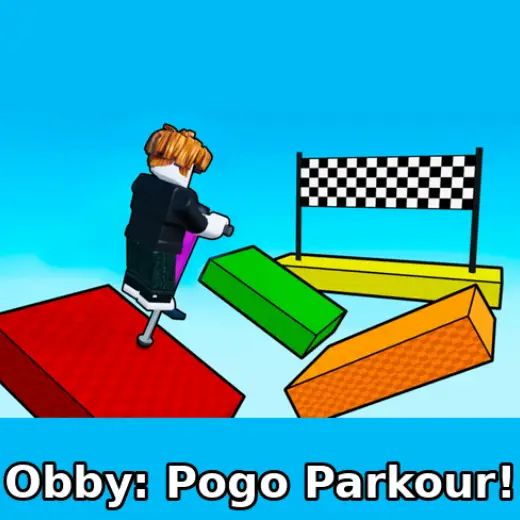





















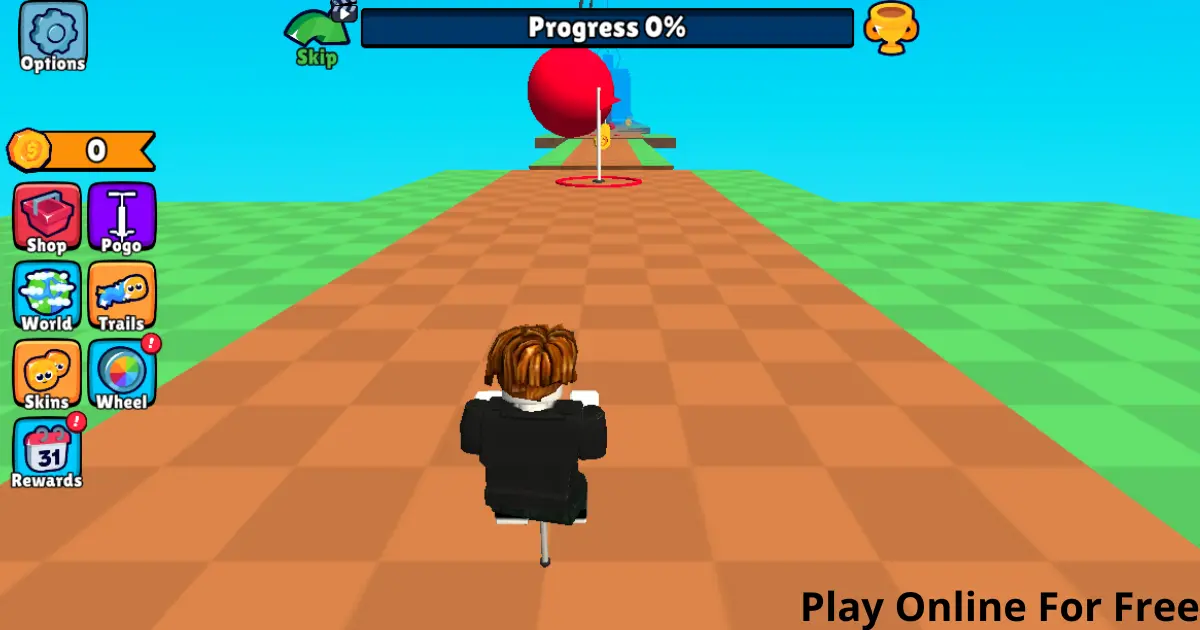
Obby: Pogo Parkour! is a precision parkour challenge where your pogo stick is both your movement tool and your biggest risk. The loop is simple: clear obstacle sections, hit checkpoints, and keep your momentum without getting bounced into hazards.
Play Now: Jump into Obby: Pogo Parkour! in your browser and start with the early levels to learn the timing windows.
As an online or browser game, it is designed for quick sessions, and most versions run smoothly in a modern desktop or mobile browser.
Key Features
- Pogo based movement that rewards consistent timing and controlled landing angles.
- Checkpoint driven stages that typically ramp difficulty with tighter platforms and traps.
- Parkour obby layouts that mix jumps, narrow rails, and moving obstacles.
- Fast restart loop that encourages learning patterns instead of grinding stats.
- Multiplayer friendly pacing in many versions, with visible progress and retry pressure.
- Simple controls with depth from micro taps, camera control, and momentum management.
What is Obby: Pogo Parkour!?
Obby: Pogo Parkour! is an action parkour obstacle course, often called an “obby,” where you navigate floating platforms and trap sections using pogo physics. Your core loop is: spawn, bounce through a segment, tag a checkpoint, then push into the next segment with a slightly harsher margin for error.
The tactical dynamic comes from managing vertical boost versus horizontal drift. A high bounce can clear gaps, but it also increases the chance you clip a ledge or overshoot a landing. What makes this different from typical Parkour Obby games is that your jump height is not a single button press. It is a rhythm: compress, pop, stabilize, then commit to the next platform.
If you are searching for Obby Parkour online, expect the gameplay to feel like a timing puzzle disguised as an action runner.
How to Play
Your goal is to reach the end of each course section by bouncing from platform to platform, avoiding hazards and falls. Most versions use checkpoints that save your progress within a stage. You typically “lose” by falling off the course or touching a kill surface (often red zones, lasers, or spikes), which sends you back to the last checkpoint.
Progression usually works as a sequence of levels or towers. Early stages teach safe landings and straight jumps. Later stages add moving platforms, narrow beams, and sections that require short, controlled hops instead of maximum height.
Controls
Controls can vary by site and device, but the most common layout is below. On keyboard or mouse, you can use Space or Left Click to Bounce or Jump, A/D or Arrow keys to Move left or right, and Mouse move for Camera look. R is sometimes used for Reset or Respawn, and Esc for Pause or Menu.
On mobile, you can Tap a button or Tap the screen to Bounce or Jump, use a Virtual stick or Swipe to Move left or right, and Drag to look with the Camera. On screen reset and Menu icon are common for Reset or Respawn and Pause or Menu respectively.
Micro cue: If your pogo starts sliding on a small platform, stop steering and let it settle for half a beat, then hop.
Core Gameplay Mechanics
Main system (movement loop)
When you compress the pogo and release, the game converts that timing into upward lift plus a small forward drift based on your input direction. The landing is the real skill check: the game often reads your angle and speed on contact, so a tilted landing can turn into a sideways bounce that pushes you off narrow ledges.
Tactical dynamics (reading the section)
When you see thin platforms, rotating bars, or gaps that look “barely possible,” do not chase max height. Use short taps to keep your bounce low and predictable, then adjust your horizontal line while you are stable. Micro cue: If you keep bumping the same corner, aim for the platform center and arrive slower.
Progression and difficulty ramp
When levels advance, spacing typically widens and safe surfaces shrink, forcing cleaner lines and better camera control. Many courses introduce moving elements or timing gates, which change the pace from free-form bouncing to planned cycles. The pressure rises because mistakes compound: a tiny overjump can chain into two more bad landings.
Key elements and fail states
Key elements are platforms, hazards, and checkpoints. Hazards often include kill zones, spinning arms, or disappearing tiles that punish hesitation. The primary fail state is falling, which usually resets you to a checkpoint. Example: A moving platform section might require you to land, wait one cycle, then commit on the next swing.
Decision Flow (Quick Win Rule)
- Start of section? Yes -> Find checkpoint line -> Do 2 safe hops -> Build rhythm
- No -> Is platform narrow? Yes -> Low bounce -> Center landing -> Minimal steering
- No -> Is obstacle moving? Yes -> Wait cycle -> Commit once -> Hold camera steady
- No -> Full bounce -> Aim ahead -> Save momentum
Strategies
Rhythm First Runs
Do your first attempt with deliberately small bounces and early camera adjustments. This maps the section and reveals where the timing windows are tight. It works because controlled landings reduce chaotic rebounds. Warning: Do not switch to full height until you have a safe “default” line.
Center Landings Rule
Aim for the center of every platform, even when a corner landing seems faster. Center contact reduces the chance of edge clipping and sideways kickouts. This works because the hitbox interactions are less punishing away from ledge geometry. Warning: On moving platforms, center landings can drift, so correct with tiny taps.
Two Hop Stabilize
After a checkpoint, do two small hops in place to lock in your timing. Then take the real jump. This works because pogo movement often feels different right after a respawn. Micro cue: If your first jump after respawn always overshoots, stabilize before committing. Warning: Do not do this on disappearing tiles.
Camera Lead Technique
Keep the camera aimed one platform ahead, not at your feet. You should see the next landing spot before you take off. It works because you reduce panic steering mid-air and pick cleaner lines. Warning: If your camera sensitivity is high, slow your mouse or use shorter drags.
Cycle Patience
For rotating bars, elevators, or swinging obstacles, wait for the easy cycle. Commit only when you can finish the entire micro sequence in one rhythm. It works because most hazards have a repeatable cadence. Warning: If you jump early, you may get forced into a late correction that pushes you into the hazard.
Momentum Budgeting
Use full height only when you must clear a long gap or a tall wall. Otherwise, keep your bounce low to preserve control. It works because speed is a resource, and too much speed makes narrow landings unreliable. Warning: In wind or slippery sections (if present), low bounces may not clear lip edges.
If you are looking up Brainrot Obby Parkour or Obby brainrot game online, the biggest difference is usually the course theme. The timing fundamentals above still carry over.
Similar Games to Obby: Pogo Parkour!
If you are a fan of precision parkour challenges, you will definitely enjoy these too:
- SuperHot: Time moves when you move, clean aim and movement decisions.
- Devil’s Road: Fast hazards, quick retries, and tight timing under pressure.
- Level Devil: Trick platforms and surprise traps that punish autopilot movement.
- Level Devil
- Devil’s Road
FAQs About Obby: Pogo Parkour!
Is Pogostuck a rage game?
Yes, Pogostuck is commonly described as a rage game because progress is highly skill-based and falling can cost a lot of time. Obby: Pogo Parkour! can feel similar when checkpoints are far apart. If you get stuck, focus on consistent low bounces and repeatable lines.
Is a pogo stick good exercise?
Yes, pogo jumping can be good exercise because it uses legs and core for balance and repeated impact control. In a game, you are training timing and reaction more than fitness. If your hands get tense, take breaks and lower sensitivity to reduce strain.
What is the name of the parkour game?
There are many parkour games, but the one here is Obby: Pogo Parkour!. The genre label you will see is often “obby” or “parkour obby.” If you are browsing Parkour games, look for titles with checkpoints, obstacle towers, and short restart loops.
How to jump really high on a pogo stick?
To jump higher, time your compression and release so the bounce is clean, then keep your movement input steady through takeoff. In most versions, spamming direction changes reduces height and stability. If you keep hitting ceilings or bars, switch to medium height and land centered.
What is the best free parkour game?
The best free parkour game depends on what you want. If you like precision timing, Obby: Pogo Parkour! is a strong pick. If you want freer movement, look for first-person parkour runners. As an online or browser game, variety is huge, so test three and keep the one that feels most readable.
What is the best parkour game ever?
There is no single best parkour game ever because players value different things like realism, speedrunning, or creative courses. Some prefer physics-heavy obstacle games, while others prefer wall-run style movement. If you want progression and repeatable skill growth, choose a game with consistent checkpoints and clear fail states.
What is the most realistic parkour game called?
Games that aim for realism usually focus on body movement, momentum, and grounded animations rather than arcade bouncing. “Realistic” also varies by platform and control scheme. Obby: Pogo Parkour! is typically not realism-first, it is more about timing and pogo physics, which is its own skill set.
Technical
Obby: Pogo Parkour! is typically an HTML5 game and may use WebGL that runs in a modern browser like Chrome, Firefox, Safari, or Edge. On desktop, a mid-range PC should handle it smoothly if you close heavy tabs. On mobile, performance depends on device age and thermal limits.
If you are playing Obby Parkour online in a browser build, it is usually no download, which makes quick retries easy. If a site offers an optional app, that version is separate, and your progress may not sync.
Micro cue: If input feels delayed, lower graphics effects (if available) and avoid playing on battery saver mode.
Final Verdict
Obby: Pogo Parkour! is a clean action obby that turns parkour into a timing discipline. Its strengths are the fast retry loop, readable checkpoint progression, and the high skill ceiling that comes from controlling bounce height and landing angle. The limit is that pogo physics can feel unforgiving, especially on narrow platforms or moving hazards.
If you enjoy Parkour Obby games, this is a good fit for players who like practicing a section until it becomes automatic. If you prefer pure speed with fewer resets, pick something with wider platforms and more forgiving movement.
Play it as an online or browser game when you want quick practice sessions, and if your version is browser-based it is often no download. Start slow, stabilize after checkpoints, then scale up bounce height only when the course forces it.
Google play: https://play.google.com/store/apps/details?id=com.CAYN.TowerOfHellObby&hl=en_US
App store: https://apps.apple.com/us/app/obby-parkour-runner-game/id6502553938




bkhcd